Every number traced back to something measured
A quote is only defensible if each figure on it came from somewhere. Lasertally reads the solid and records what it found, so every line on the price is tied to a quantity you can point at.
- Pierces, cut length, bends and bounding box read straight off the geometry, in the units your shop works in.
- Pre-quote checks that refuse to guess. Material priced, cut speed known, geometry priceable, part fits stock. A missing figure shows as a gap, never as a zero.
- Your rate card, to the cent. Programming, loading, run rates, pierce rates, travel, admin, markup, lead-time tiers, secondary ops, and operations you invent yourself.
- Formed parts unfold. A bent bracket is priced on its developed flat pattern, with the bend allowance the metal actually needs.
A pre-quote check is a refusal, not a warning
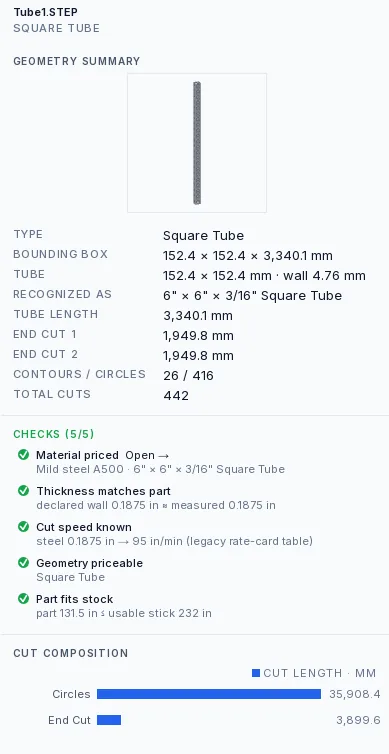
Most estimating tools will happily hand you a number built on a rate nobody set. Lasertally will not price a part until four things are known: the material has a price, the cut speed exists for that material and thickness, the geometry is priceable, and the part fits the stock. A missing figure shows as a gap in the panel rather than quietly becoming a zero in the total, because a zero in a total is how a job gets quoted at a loss and nobody finds out until it ships.
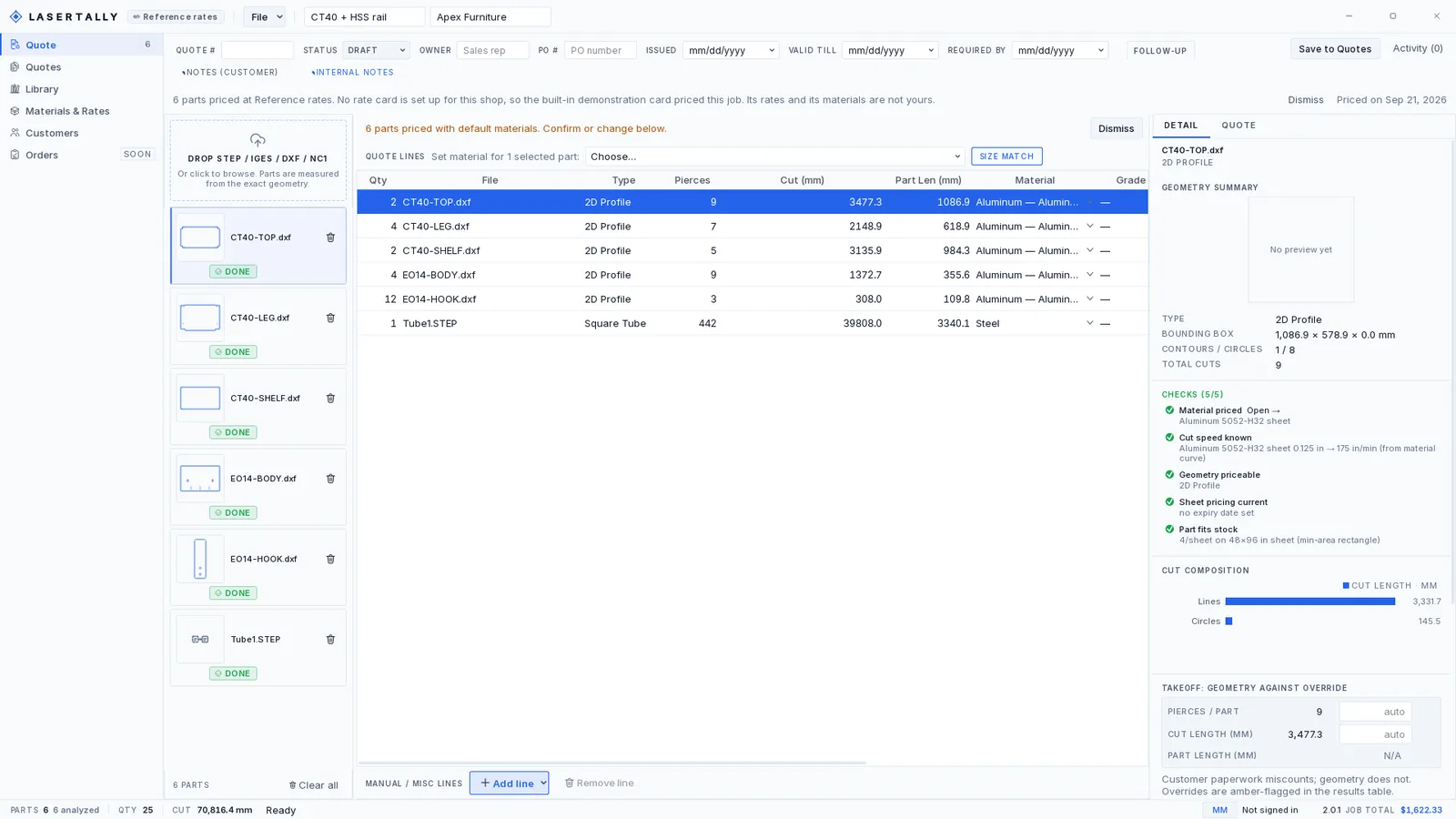
Those four always run. More appear when they apply, and which ones appear tells you something about the part. The tube in the pictures below is checked for thickness matches part, because a declared wall and a measured wall can disagree. The aluminium plate beside it is checked for sheet pricing current instead, because a sheet price book goes stale. Both read five of five. They are not the same five.
Cut speed in particular is a ladder, and where a part landed on it matters. An exact match for that material at that thickness sits at the top. A default speed sits at the bottom, and a part that priced on the default speed always warns, every time, with no way to turn that warning off. A speed that came from somewhere is a price you can defend. A speed that came from nowhere is a guess wearing a decimal point.
A price you can defend on the phone
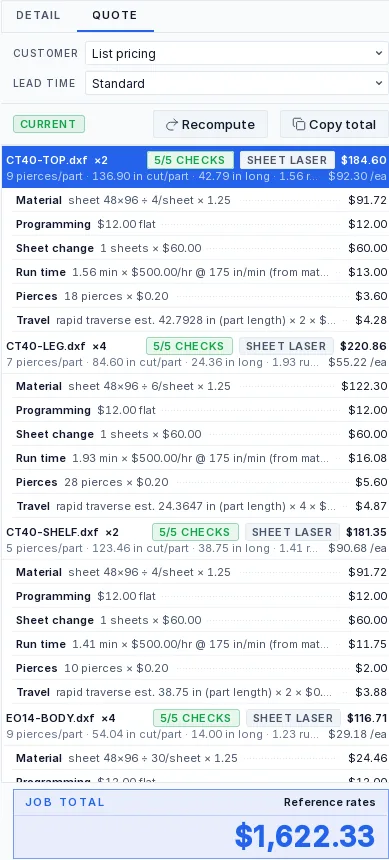
When a customer asks why a part costs what it costs, the answer is on the screen and it is written out. Not a tooltip on the line and not a report you generate afterwards: the derivation is the line, and somebody holding the phone can read it aloud.
The console top at the head of that panel prices at $184.60 for two, and it shows its working. Material: sheet 48×96 ÷ 4/sheet × 1.25. Programming, $12.00 flat. One sheet change at $60.00. Run time: 1.56 min × $500.00/hr at 175 in/min, from the material curve. Eighteen pierces at $0.20. Travel estimated from the part length.
Every one of those is a quantity measured off the file multiplied by a rate you set. There is nowhere in that line for a number somebody typed because it felt about right.
Quantity breaks are eight re-prices, not a discount table
A line can carry up to eight quantities, and every one of them is a full re-price.
Setup is amortized across the run rather than multiplied by it. Material is recomputed against what that run actually consumes. A break that crosses into a different lead-time tier prices as that tier. The figure at 500 off is a quote in its own right, not the figure at 1 off with a percentage taken away from it, which is the version that quietly loses money at the top of the range and leaves it on the table at the bottom.
Stick pooling, or one stick a part
Tube can be charged two ways and the difference is real money.
Per part, every line buys its own stock. Pooled, the lines that share a section and a material share the sticks: they are packed onto stock first-fit-decreasing and the cost is split pro rata by the length each line took.
Pooled is what actually happens on the floor when three lines of the same 6 by 6 HSS run through together. Per part is the honest number when they will not. It is your call, per quote, and the quote says which one it used.
The blank is the smallest rectangle the part fits in
Sheet material is charged against a blank, and which blank you pick is the difference between a competitive price and one that loses.
The ladder runs: the nested result if the job has one, then the minimum-area rectangle the part actually fits in, then the flat pattern, then the bounding box. Only the last of those is the axis-aligned box most estimating tools stop at.
A 300 by 100 plate that the customer happened to save rotated 45 degrees is the example that makes the point. On its bounding box it is 32 parts to a sheet. On the smallest rectangle it genuinely fits in, it is 77. The part did not change. Only the way the file was saved did, and one of those two numbers costs you the job.
Which rung it used is on the check, not buried. The part-fits-stock line in the picture above reads 4/sheet on 48×96 in sheet (min-area rectangle), so the basis of the material price is stated on the same screen as the price.
Which CAD files Lasertally reads
Lasertally reads STEP, IGES, DXF and DSTV NC1 files. SAT and DWG are not supported, and every CAD package can export one of the four that are.
| Format | Extensions | Flat parts | Tube | What Lasertally reads from it |
|---|---|---|---|---|
| STEP | .step, .stp | Yes | Yes | Solids and 2D profiles. Tube sections are detected automatically and matched against the standard sizes in your material card. |
| IGES | .igs, .iges | Yes | Yes | Solids. For tube the axis is found by measurement and the section classified, or honestly called free form. |
| DXF | .dxf | Yes | Flat only | 2D profiles. Contours, circles and cut length, measured off the drawing geometry. |
| NC1 (DSTV) | .nc1 | Tube only | Yes | Tube and structural sections, with their holes and end preparations. |
| SAT | .sat | No | No | Not supported. Export STEP or DXF from any CAD package instead. |
| DWG | .dwg | No | No | Not supported. Export STEP or DXF from any CAD package instead. |
Your card, your metals, your speeds
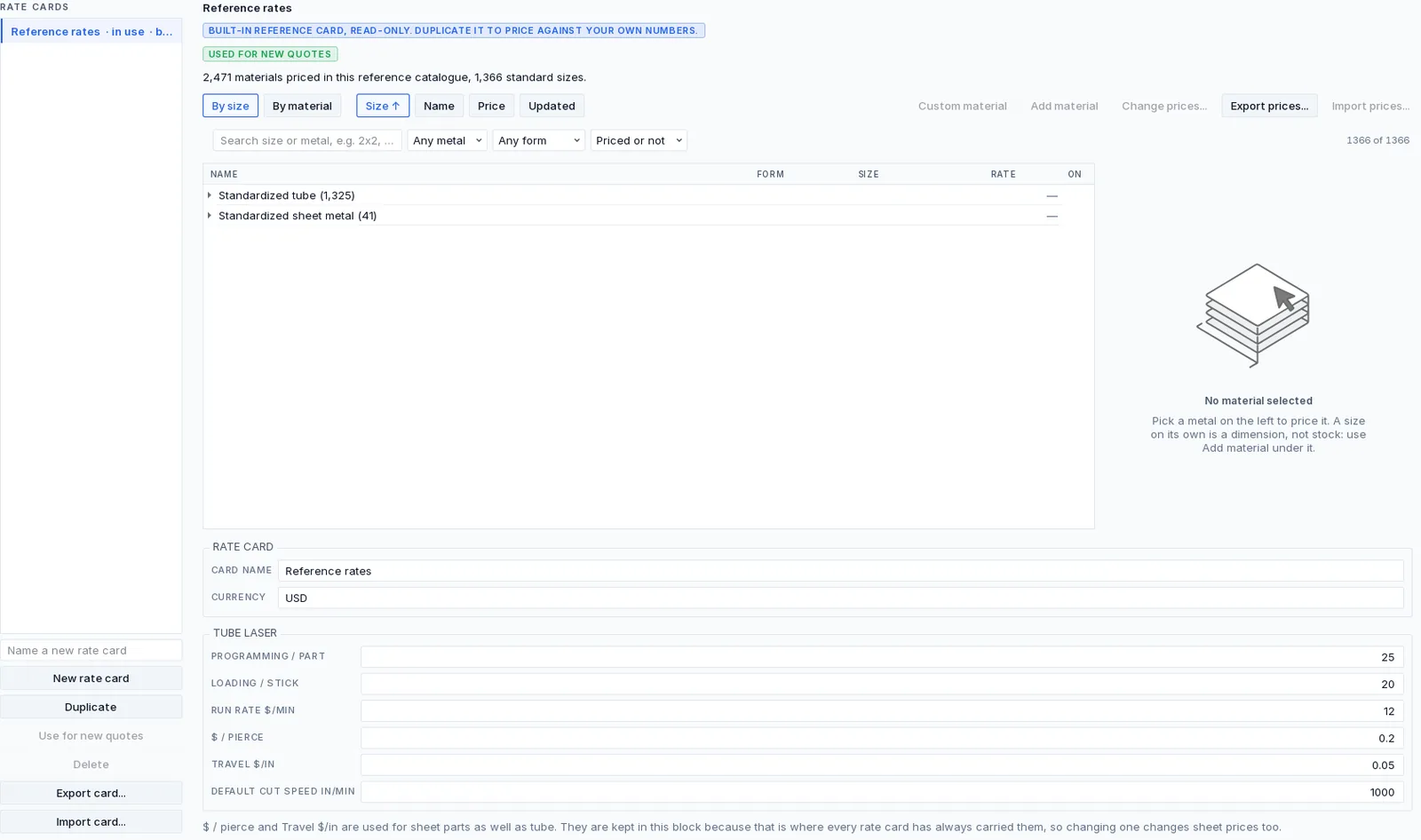
Every rate, every material and every cut speed comes off a rate card. Programming, loading, run rates, pierce rates, travel, admin, markup, lead-time tiers, per-machine rates, secondary operations, and operations you invent yourself.
The card Lasertally ships with is a reference: 2,471 materials priced across 1,366 standard sizes, and it is read-only. You duplicate it and price against your own numbers. It is not locked to make you upgrade, it is locked because a demonstration price that quietly becomes your price is the worst outcome this product has.
Which is also why a job priced on it says so on the quote, in a banner nobody can mistake for decoration: no rate card is set up for this shop, so the built-in demonstration card priced this job, and its rates and its materials are not yours.
No CAD file? Draw the part
Not every RFQ arrives as a file. A dimensioned print, a marked-up PDF, a part somebody measured with calipers on the bench.
Both products carry a parametric sketcher with a real constraint solver under it. Draw the profile roughly, then tell it what is meant to be equal, parallel, tangent or dimensioned, and it resolves to the shape you meant rather than the shape your mouse managed.
What comes out is a part like any other. Measured the same way, checked the same way, priced the same way as a STEP file the customer sent.
What leaves the building
| Export | What it is |
|---|---|
| Quote PDF | The customer-facing document, with a preview on screen before anything is written, so nobody finds the wrong logo on it after it has been emailed. |
| Excel workbook | An .xlsx with two sheets: Quote, which is the priced document, and Takeoff, which is the measured geometry behind it. |
| JobBoss CSV | For shops whose ERP wants the job rather than the paper. |
| Send to Nesting | A .ltjob bundle written into a folder both computers can see, carrying the DXF profiles and the developed flat patterns of bent parts. Save the quote first: the nesting seat files the job under its quote number. It names every part it could not carry and why. There is no push button and no relay, and the nesting page says exactly how the other end picks it up. |
Calibrated against a real quotation, to the cent
Lasertally's quoting engine reproduces a real fabrication shop's three-part tube quotation exactly: $306.12, $379.74 and $1,269.22, totalling $1,955.08. The geometry engine is pinned to ground-truth pierce counts on real customer RFQ files, one of which contains 346 pierces where the drawing said fewer. On top of the engine's own suites, every release has to reproduce 3,655 reference cases, and a build that does not reproduce the reference quotes exactly does not ship.
Price your next RFQ from the file it arrived as.
Sheet or Tube is $479 a month, Complete is both for $759. Five seats, unlimited quotes, and a full refund inside 14 days if it is not what you expected.