Laser nesting software

Won the job? The nesting is already done.

Lasertally Nest is laser nesting software and CAM for sheet. It takes the quote you already priced, nests the parts true-shape on the sheet stock and offcuts you actually have, applies cutting technology, lead-ins, kerf compensation, micro joints and cut sequencing, then posts the program for the machine.

Nesting is a $349 a month add-on that sits on top of any Lasertally plan. It nests both sheet and tube.

Windows may warn you. The installer is not code-signed yet, so the first time you run it Windows SmartScreen can say "Windows protected your PC". Click More info, then Run anyway. The file comes only from our own update server, updates.lasertally.app.

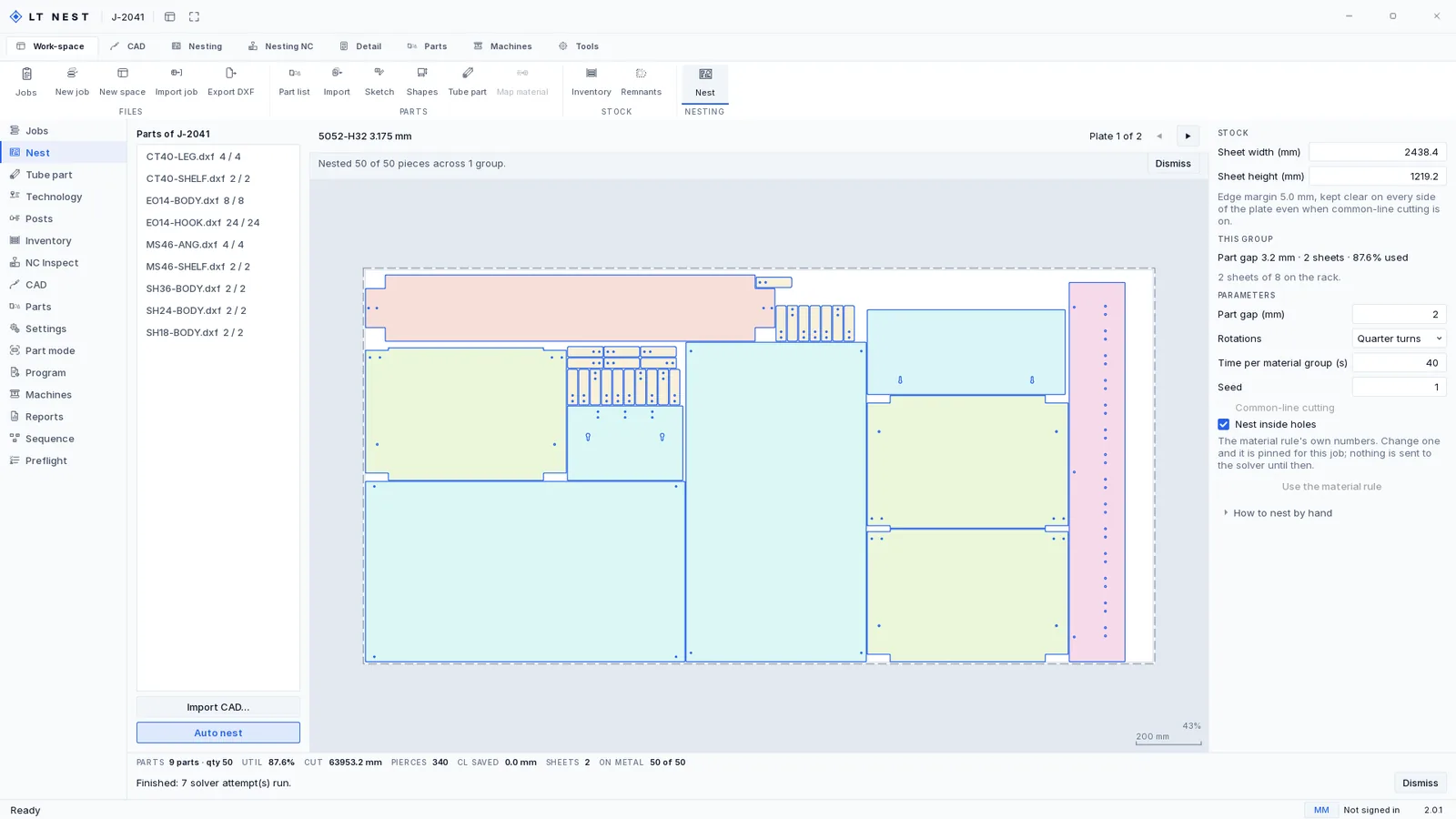
The Nest page of Lasertally Nest with job J-2041 solved on a 48 by 96 inch plate of 5052-H32 aluminium. Nine part types, fifty pieces, packed true-shape with small parts sitting inside the windows cut out of larger ones. The panel on the right gives the sheet size, a 3.2 mm part gap, quarter turns, a forty second limit, seed 1 and nest inside holes ticked, with common-line cutting greyed out. The footer reads 87.6 per cent used, 63,953.2 mm of cut, 340 pierces, two sheets, fifty of fifty on metal, and beneath it: finished, seven solver attempts run.
J-2041 solved: 50 of 50 pieces, nine part types, two 48 by 96 plates, 87.6% used, 340 pierces. Seven solver attempts ran before it settled on this one.

Five layouts, one answer

Auto nest does not run one algorithm and hand you what it got. It builds a portfolio and solves all of it, then picks.

The rule layout. The same rule under a second seed. A two-way rotation. A modestly tighter gap that still sits at or above the family floor. And a conjoined pass that puts parts on a common line. Every racked offcut gets a candidate of its own on top of that, plus one sweep across the whole rack. On the plate above that came to seven attempts, and the page says so rather than making you take the first answer on trust.

Then it chooses, and the order it chooses in is the part worth knowing: fewer sheets first, utilisation second. A layout that is a percentage point tighter across three sheets loses to a layout that fits on two, because the second one is the cheaper job and the first one is the better-looking number.

Spacing comes from the metal

The gap between parts, the margin at the sheet edge and the width of a micro-joint come from the material family and the thickness. They are not three numbers you set once and then carry onto every job after it. Sixteen gauge mild steel and half-inch aluminium do not want the same spacing, and a nester that asks you for one number is asking you to remember which job it was set for.

On the plate above the rule gave a 3.2 mm gap between parts and kept 5 mm clear at every edge. It also declined to conjoin anything: aluminium's ceiling for common-line cutting is 3.0 mm and that plate is 3.175 mm, so the control is greyed out and the footer reads CL SAVED 0.0 mm. Forcing it on would override the metal's own rule, which is the opposite of what this section is about.

Every value is overridable, because your shop knows things a rule does not, and changing one pins it for that job rather than for every job after it. The margin has a floor of one millimetre, which is the one number the rules will not let you argue with.

Cut order is a safety rule, not a preference
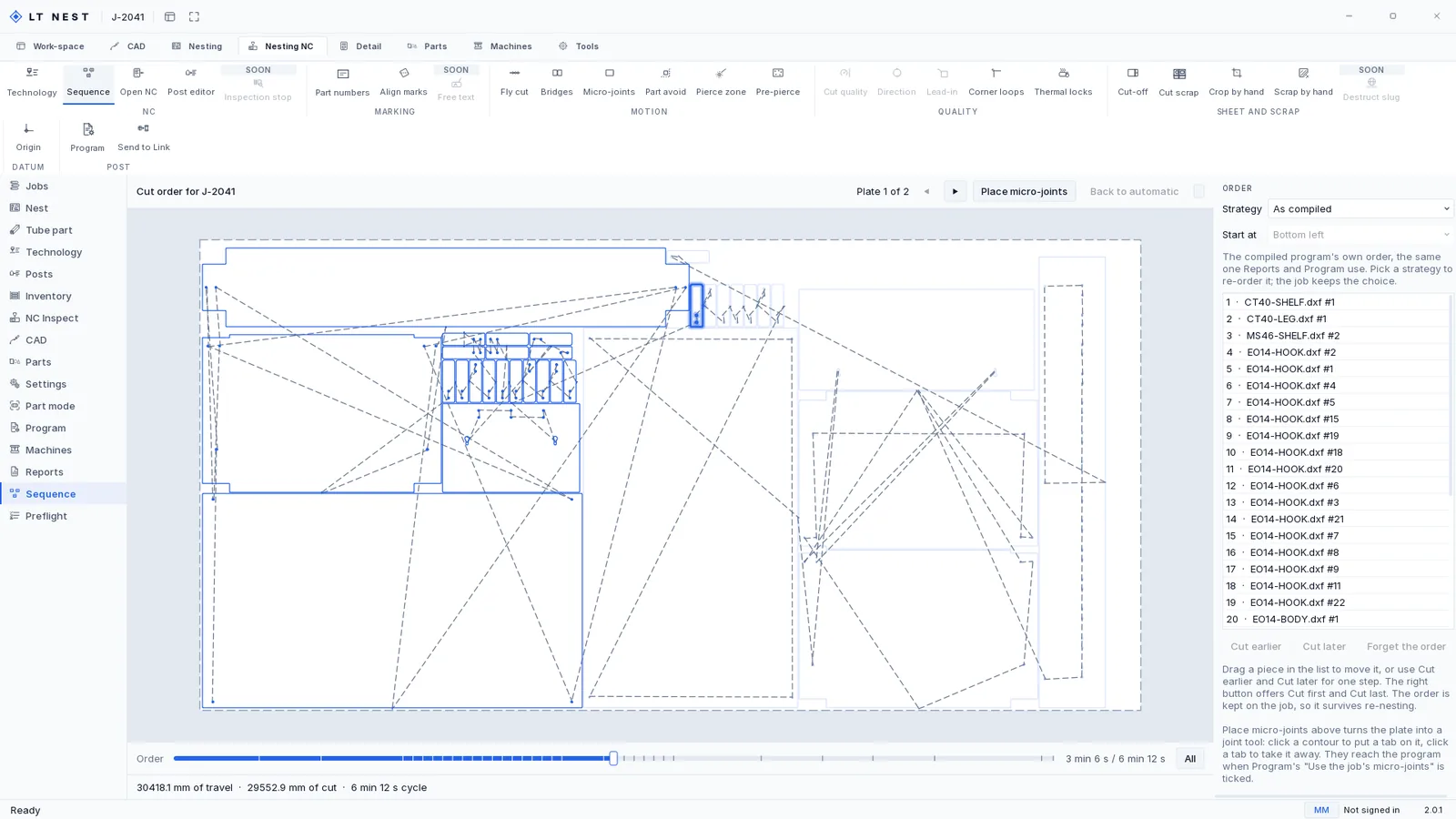
The Sequence page of Lasertally Nest showing the cut order for J-2041, parked at 3 minutes 6 seconds of a 6 minute 12 second cycle. The pieces cut so far are drawn solid and the rest are pale, the rapid moves between them are dashed, and the ordered piece list runs down the right with each part named and numbered.
The cut order for J-2041, parked at 3 min 6 s of a 6 min 12 s cycle. The dashed lines are the rapid moves: 30,418.1 mm of travel against 29,552.9 mm of cut.

The moment a part's outline is finished, it is loose.

A loose part in a sheet can tilt, and a tilted part is in the path of the head. So the sequence treats that as a hard constraint rather than an option: holes before outlines, wraps before end cuts, nothing freed until everything that had to be cut inside it is done.

The order you are looking at is the compiled program's own, which is the same one the report and the program page use, so no two screens in the product can disagree about what the machine will do. Drag a piece to move it and the choice is kept on the job, so it survives a re-nest.

The same pass applies the cutting technology. Lead-ins go where they will not scar the part, the kerf is compensated so the finished dimension is the drawn dimension, and micro-joints go where a part needs holding.

Your stock, not a catalog

Most nesters ask what size sheet you want and lay parts on an idealised rectangle. That is a nest that is efficient against a sheet nobody has.

Lasertally Nest starts from the rack instead: the sheets in the building, the offcuts left over from every job before this one, and the tube sticks.

Two rules decide which piece it reaches for. Oldest first, so material does not age out in a corner, and the rack keeps the date each line arrived so that rule has something to work from. And the smallest piece that can still do the job, because spending a full sheet on a part a remnant could have carried is how a rack silts up with pieces too small to use and too big to throw away.

The Inventory page of Lasertally Nest on its Sheet stock tab: four lines of 5052-H32 aluminium in two sizes across Rack A and Rack B, each with the quantity on hand, the date it was received and its cost per sheet. Tabs for Tube stock and Remnants sit beside it, and a panel on the right counts what is on the rack: eight sheets of one gauge, four of the other, three tube lengths and three offcuts.
Sheet stock with the date each line arrived and what it cost. The panel counts the whole rack: eight sheets of one gauge, four of the other, three tube lengths, three offcuts. This is the list the nester is allowed to draw from.

It books the metal it uses

Writing a program draws the stock off the rack once and records it against the job. Re-printing the same program does not draw it twice, which is the failure mode that makes inventory counts drift until nobody trusts them. Whatever usable material is left goes back on the rack with its own tag.

The offcut book has to balance: parts plus racked offcut plus scrap equals the area that was opened. When it does not balance, the report says so rather than rounding the difference away.

Cycle time is not an estimate typed into a field either. In the product's own words on that page: cycle time is the compiled program's own estimate, so this page cannot disagree with Sequence or Program about it.

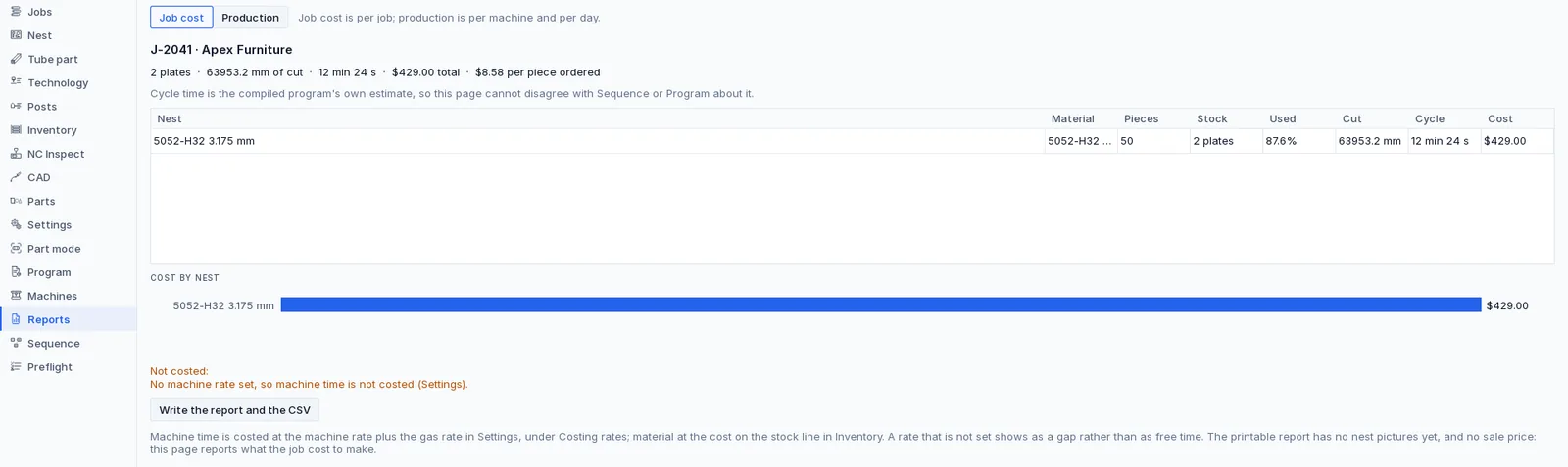
The Reports page of Lasertally Nest, Job cost tab, for J-2041 Apex Furniture: two plates, 63,953.2 mm of cut, 12 minutes 24 seconds, $429.00 total and $8.58 per piece ordered, with a table giving pieces, stock, percentage used, cut length, cycle and cost, and a cost-by-nest bar beneath it. An amber note reads: not costed, no machine rate set, so machine time is not costed.
J-2041 cost out: two plates, 12 min 24 s, $429.00, $8.58 a piece ordered. Machine time is not in that figure, because this shop has not set a machine rate, and the page says so instead of charging nothing for it.

That amber line is the whole policy in one sentence, and it is the page's own: a rate that is not set shows as a gap rather than as free time. A zero in a total is how a job goes out at a loss and nobody finds out until it ships, so there are no zeros standing in for figures nobody supplied.

Every nest can be replayed, or it refuses

A solved nest carries its own provenance: the seed it was solved under, how many generations ran, how many placements were evaluated, and two digests, one of the inputs and one of the result.

That is not bookkeeping. Hand the same nest to another machine and it re-materialises in a single evaluation, or it refuses outright. There is no third outcome where it quietly produces something close and nobody notices the parts moved.

The kernel is single-threaded and deterministic given a generation ceiling, which is what makes that promise keepable. The search around it is bounded by the clock instead, and you can see the bound on the plate above: forty seconds per material group, seed 1. A slower PC gets through fewer candidates in forty seconds. Whichever one it chose is recorded, and that one replays exactly.

The tube nester states the same thing on its own panel: the same seed and the same parts always give the same nest, so a result can be reproduced when somebody asks why a part landed where it did. That question gets asked about a week after the job ships, which is exactly when nobody can remember.

The quote is already the nest

A won quote crosses the building as one file, and it says what it could not carry.

On the quoting seat, File › Send to Nesting writes a .ltjob bundle: the DXF profile of every flat part, and the developed flat pattern of every bent one. A folded part handed over as its folded solid nests without complaint and cuts scrap, so it is unfolded before it travels or it does not travel at all.

It writes into a folder both computers can see. A mapped drive, a share on the shop network, a synced folder. There is no relay and no push, and I would rather say that plainly than describe a folder as a pipeline. On this side, the Jobs page has an Inbox that finds what has arrived, so nobody browses for it. A quote that has been marked won and has synced across can be promoted from the same list instead.

Save the quote first. The nesting seat files the job under its quote number, and an unsaved quote has none. Send the same bundle twice and the second one is shown on the list and marked as already on the queue rather than quietly vanishing, because a shop that sent it twice needs to know the second one landed and did nothing.

Two things do not cross, and the send names them rather than dropping them quietly. Tube parts do not, because the sheet route is flat-only by charter. And a flat part that arrived as a STEP file has no DXF to copy, so there is nothing in the bundle to send. Both are imported on the nesting seat with Parts › Import instead, which reads the same formats the quoting seat does. Every part left out is listed with the reason it was left out.

The Jobs page of Lasertally Nest: four jobs for Apex Furniture with their material, machine, piece counts, sheet counts and due dates, carrying the statuses complete, nested, programmed and quoted. Filter chips across the top count the jobs at every stage from quoted through to archived, and the toolbar offers an inbox and the accepting or discarding of a revision.
The queue on the nesting seat: four jobs at four stages, from quoted through nested and programmed to complete. A re-sent bundle arrives here as a revision you accept or discard.

What it writes for the machine

Posting a job writes a folder, not a file, because a program on its own does not tell a setter anything.

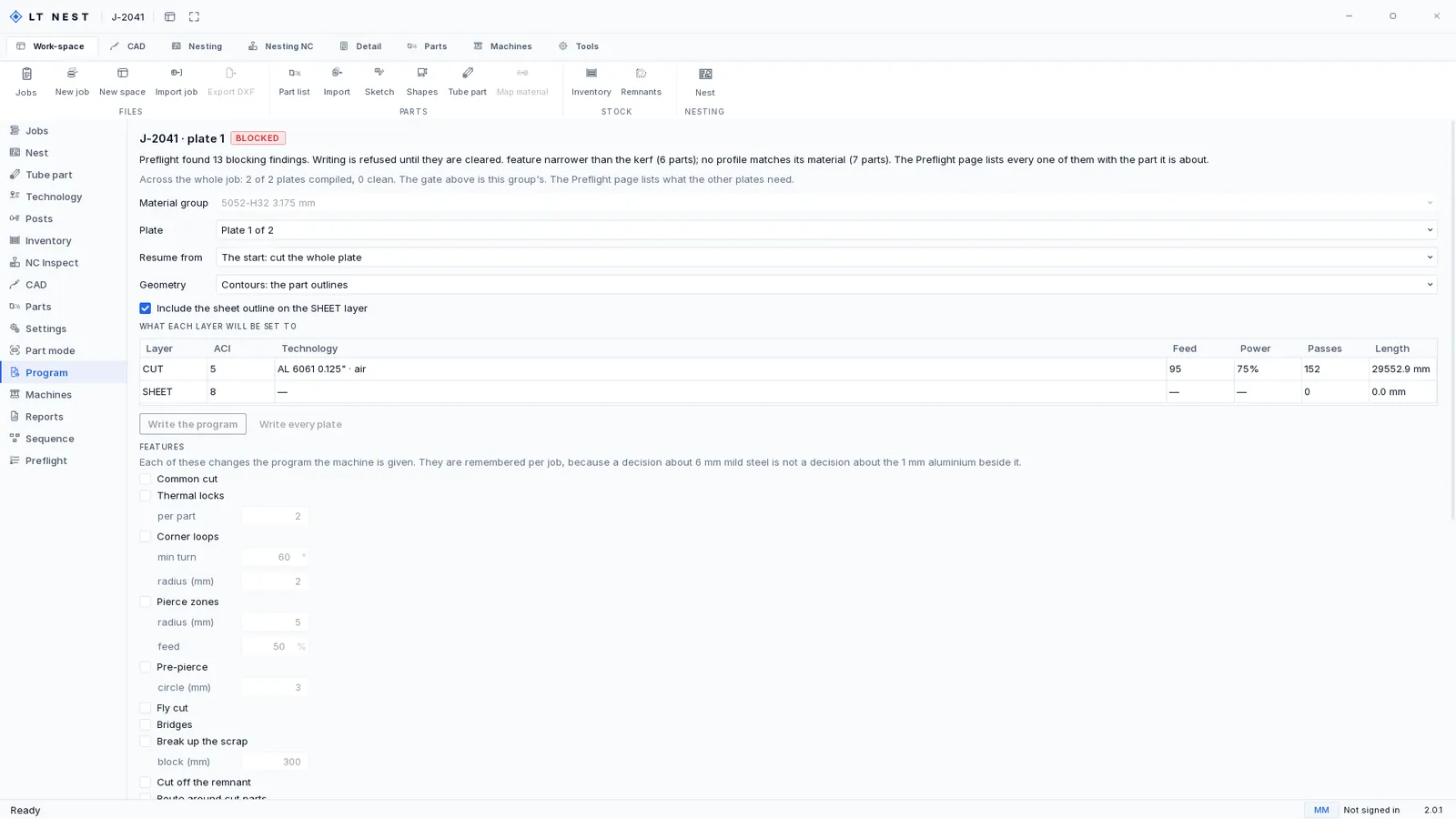
Before any of it is written, the Program page shows exactly what each layer will be set to. The job below never got written: the gate refused it, for reasons the next section goes through. The layer map is still there to read, which is the point of showing it here.

The Program page of Lasertally Nest for plate 1 of job J-2041, marked BLOCKED. It reads: preflight found 13 blocking findings, writing is refused until they are cleared, feature narrower than the kerf on six parts and no profile matches its material on seven. A table headed what each layer will be set to gives the CUT layer as ACI 5 at feed 95, 75 per cent power, 152 passes and 29,552.9 mm, with the technology named as AL 6061 0.125 inch air. The Write the program button is greyed out.
The layer map for plate 1: CUT on ACI 5, feed 95, 75% power, 152 passes, 29,552.9 mm. Write the program is greyed out, because preflight is holding 13 blocking findings and writing is refused until they are cleared.
What a posted job writes
OutputWhat is in it
Layered DXF and layer mapThe cut geometry on layers, and a map recording feed, power, frequency, gas, pressure, focus, the heights, pierce delay and kerf for every layer, so the numbers that produced the cut travel with the cut.
Setup sheetOne self-contained HTML file. It opens on a shop PC with nothing installed on it and nothing to fetch.
PlotThe nest as a drawing, for the person who wants it on paper next to the machine.
ProgramThe posted output itself: a CypCut-layer DXF, or generic ISO G-code, with a rotary axis for tube.
Nesting reportUtilisation, cycle time from the compiled program, and what was placed against what was asked for.
Job-cost CSVThe cost lines as data. A figure the job has no rate for is a dash in this file too.
.ltprog bundleAll of the above in one archive, staged atomically with the manifest written last, so a half-written post cannot be mistaken for a finished one.

On your particular machine. Two posts exist, and neither has been tested against your controller. That is deliberate rather than an omission I am hoping you will not notice: I do not have your machine, and a compatibility claim I cannot stand behind costs you a scrapped sheet. What happens instead is that every program is read back after it is written and verified against the geometry it came from, which is a check I can actually run. Email me your controller and I will tell you straight where it stands.

Micro-joints are the one thing G-code cannot carry. There is no way to express a deliberate gap in a continuous contour, so the post drops them, counts them, and declares it. A micro-joint that was the only thing holding a part down is called out by name rather than left for the operator to discover.

This job was refused, and here is why

The gate that stopped it is the one below, and I have left it stopped rather than finding a job that passes.

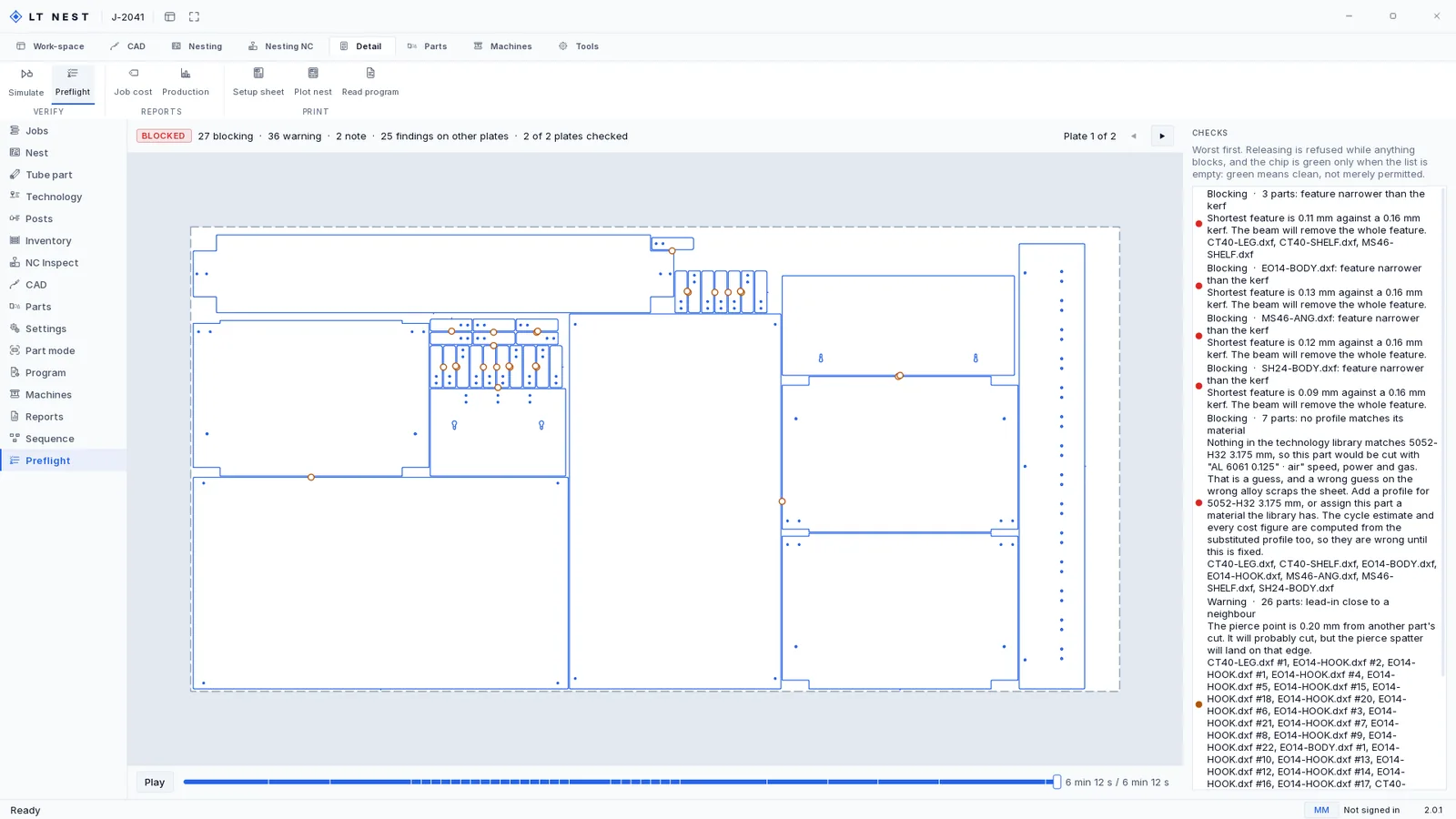
The Preflight page of Lasertally Nest for job J-2041, headed by a red BLOCKED chip and the counts 27 blocking, 36 warning, 2 note, 25 findings on other plates, 2 of 2 plates checked. The findings run worst first down the right, each naming the parts it is about: three parts whose shortest feature is 0.11 mm against a 0.16 mm kerf, seven parts for which nothing in the technology library matches 5052-H32 at 3.175 mm, and twenty-six parts whose lead-in sits 0.20 mm from a neighbour's cut.
J-2041 at the release gate: BLOCKED, 27 blocking, 36 warning, 2 note, across both plates. Every finding names the parts it is about, so each one is a thing somebody can go and fix.

Two things are holding it. The flat patterns contain features down to a tenth of a millimetre, and the finding says what that means rather than flagging a number: the shortest feature is 0.11 mm against a 0.16 mm kerf, so the beam will remove the whole feature. And the technology library has no profile for this metal, which is the one worth reading in full:

Nothing in the technology library matches 5052-H32 3.175 mm, so this part would be cut with "AL 6061 0.125" · air" speed, power and gas. That is a guess, and a wrong guess on the wrong alloy scraps the sheet.

It then says the part nobody says out loud: the cycle estimate and every cost figure are computed from the substituted profile too, so they are wrong until this is fixed. That is why the $429.00 in the report above is a number with a condition attached, and the product is the thing telling you so.

The page states its own rule at the top: releasing is refused while anything blocks, and the chip is green only when the list is empty. Green means clean, not merely permitted. A warning you can click past is a warning everybody clicks past by the second week.

Turn the quote you already won into a cut program.

Nest is $349 a month on top of Sheet, Tube or Complete. Full refund inside 14 days.