
Shared cuts, and a leftover you can still use
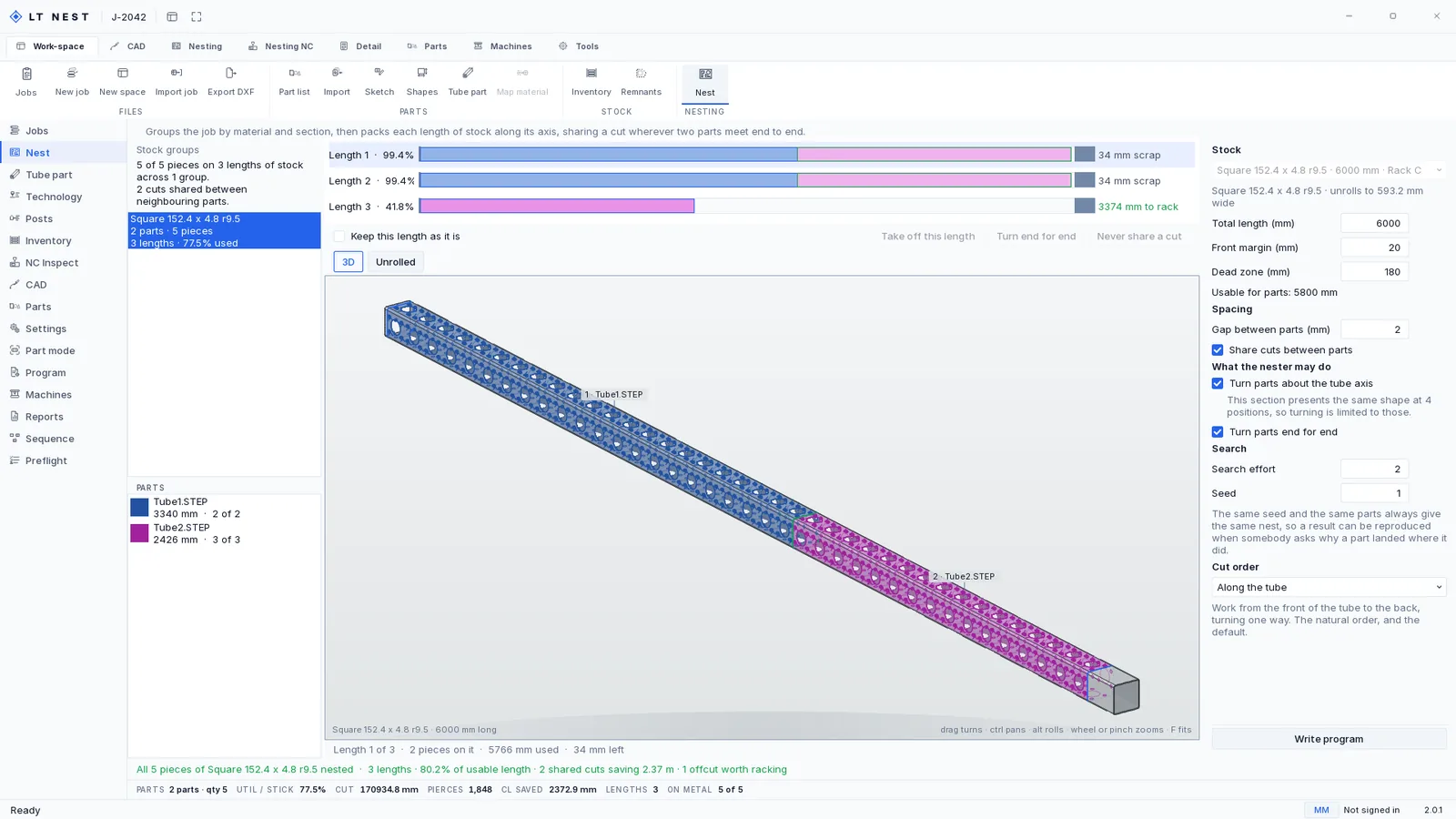
- Where two parts meet end to end, the cut is made once. That saves a pierce, a kerf of stock and the whole length of one contour, and on plain square-cut work it is close to half the cutting time.
- The chuck allowances are real. Front margin and dead zone come off before anything is placed. On the job above that is 20 mm at the front and a 180 mm dead zone, so a 6,000 mm stick offers 5,800 mm, and every percentage on the page is measured against the 5,800.
- Slack goes to the tail, in one piece. A long offcut is stock and a scattered one is scrap, so the leftover is racked, priced pro rata and labeled with a barcode and the length it can actually hold.
- It tells you what it left out. Requested, placed, still loading, cannot nest. A nester that cannot say what it dropped is not finished.
How a shared cut is decided
Two parts meet end to end and the question is whether one cut can serve both ends. It has to be answered exactly, because a wrong yes is a part cut short and a stick in the scrap bin.
Lasertally Nest samples both end cuts at 360 stations around the section and compares the two signatures, measured from each cut's own lowest point so a mitre is compared against a mitre rather than against wherever that mitre happened to start. They merge when they match within a tenth of a millimetre. A facing pair of mitres merges too, and the merged length is the first part plus the second minus the depth the shared cut eats.
Anything less than certain and it does not merge. Two cuts cost a pierce and a kerf of stock. One wrong cut costs the whole stick.
What the nester is allowed to do to make two ends meet is stated rather than assumed, as two checkboxes. It may turn a part about the tube axis, and on a square section that means four positions and only four, because the section presents the same shape at four positions and there is no fifth. And it may turn a part end for end.
Nothing here is declared. It is measured.
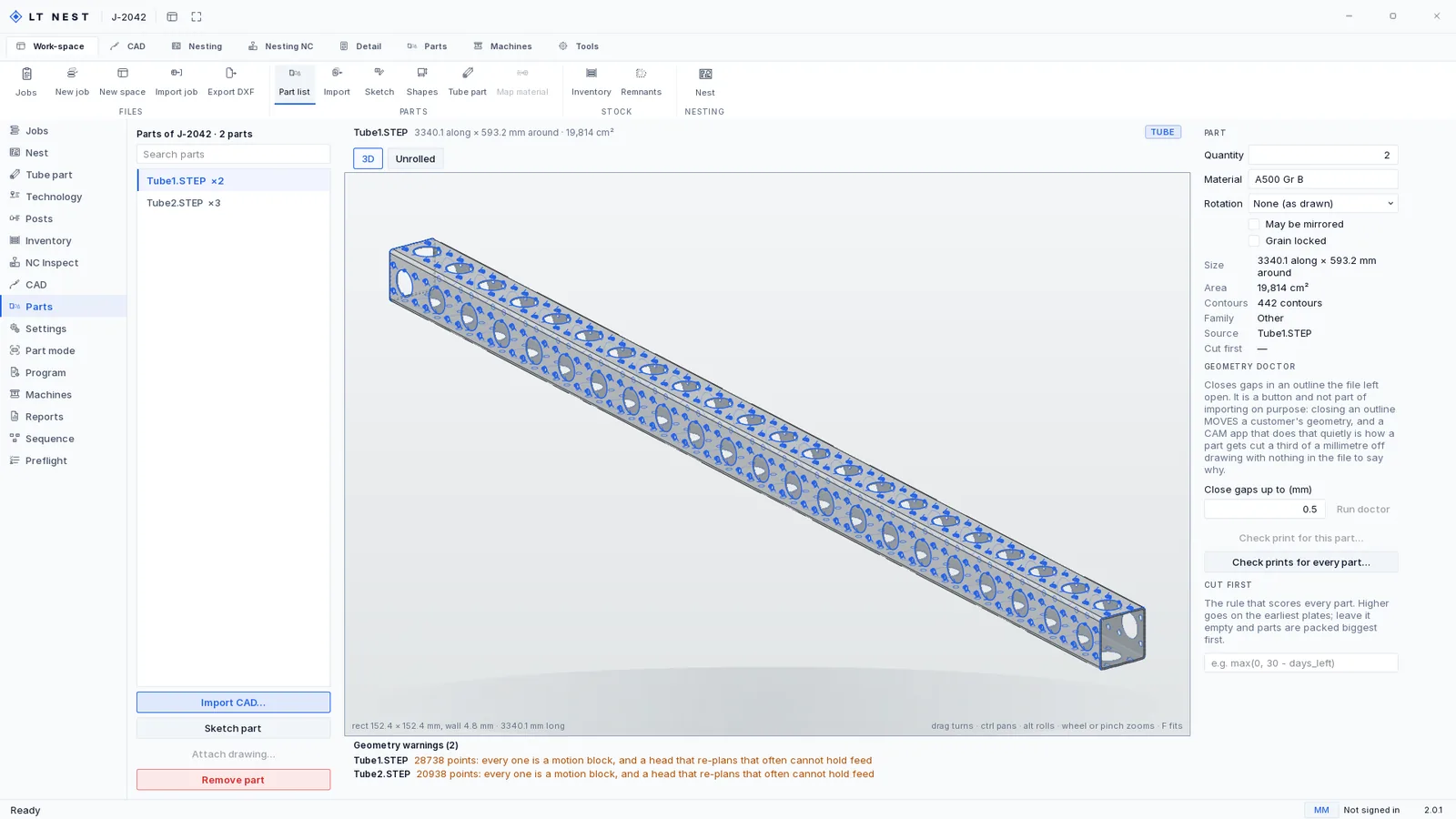
A solid comes in, the axis is found by measurement, the section is classified against the standard sizes in your material card, and the holes and end preparations are read off the faces they sit on. Then it unrolls, because an unrolled profile is what a rotary cut actually is: 152.4 mm square unrolls to 593.2 mm wide.
Look at the strip along the bottom of that picture. Both files are flagged, because 28,738 points in one outline is 28,738 motion blocks, and a head that re-plans that often cannot hold feed. Nothing has been done to the geometry to make the warning go away. There is a geometry doctor that closes gaps a file left open, and it is a button rather than part of importing on purpose: closing an outline moves a customer's geometry, and a CAM app that does that quietly is how a part gets cut a third of a millimetre off drawing with nothing in the file to say why.
Three cut orders, and one rule all three obey
The dropdown offers Along the tube, Face by face and All holes, then all cut-offs. Along the tube is the default: work from the front of the stick to the back, turning one way. Which of the three suits depends on the part and on how your machine behaves with a long unsupported end, so it is a choice rather than a default somebody made for you. All holes, then all cut-offs is the most conservative: the head covers the tube twice and it costs traverse to do it, and what that buys is that nothing is loose until the last phase.
The rule underneath all three is the one that governs plate. Wraps are cut before the cut-off, in every order, always. The cut-off is what frees the part, and a part that is already free is a part that can move while the head is still working further along the stick.
Merge Tail is the other half of it. Where a machine has a tail chuck, cut-offs close to the tail can be marked rather than cut, because the far side is going to take that stock and cut it there. It only applies when there is enough length down there for the chuck to actually hold, which is a number you set.
A stick you have locked stays locked across a re-solve. If a run genuinely cannot keep a lock, it tells you which one it let go and why. A release the operator is not told about is a setting that changed itself.
The tube nest is deterministic, and the panel says why that is worth having rather than leaving you to work it out: the same seed and the same parts always give the same nest, so a result can be reproduced when somebody asks why a part landed where it did. That question arrives about a week after the job shipped.
Utilisation is measured by length, per stick
A sheet nest reports utilisation by area. A tube nest reports it by length, and it reports it for each stick rather than as one figure for the job, because one figure for the job is the number that hides where the drop is.
The job above is the argument. The headline figure is 77.5% and it tells you almost nothing. Per stick it reads 99.4%, 99.4%, 41.8%, and now you know the shape of it: two bars are used up bar 34 mm of scrap each, and the whole of the drop is one 3,374 mm piece on the third. That is not waste. That is a length going back on the rack with a label on it, and the page says so in those words.
Tube sections Lasertally Nest recognizes
Lasertally Nest classifies ten standard tube and structural sections from the solid itself. A section it cannot match is called free form rather than guessed at, and it still nests.
| Section | Recognized automatically | Nested |
|---|---|---|
| Round tube and pipe | Yes | Yes |
| Square tube | Yes | Yes |
| Rectangular tube | Yes | Yes |
| Obround | Yes | Yes |
| Elliptical | Yes | Yes |
| Triangular | Yes | Yes |
| Angle | Yes | Yes |
| C channel | Yes | Yes |
| U channel | Yes | Yes |
| H beam | Yes | Yes |
| Anything else | Called free form | Yes |
Preflight: the program, played on the stick
Before a tube program can be written, Preflight runs every check on it and then shows you the length of stock on a schematic tube laser with the program played over it. The stick feeds and turns under a head that stands still, the way a tube laser actually works. Every cut traces in the order the machine will make it, each finished piece slides off at its cut-off, and every finding is a pin on the metal where it is, grouped by piece in the list beside it.
It is the same stick the Nest page shows, drawn the same way: each piece meshed from its own part, holes as holes and end cuts as ends, in the colour that part has everywhere else, with a ring where one piece stops and the next begins. A cope or a miter on the stage is the shape it will be cut to.
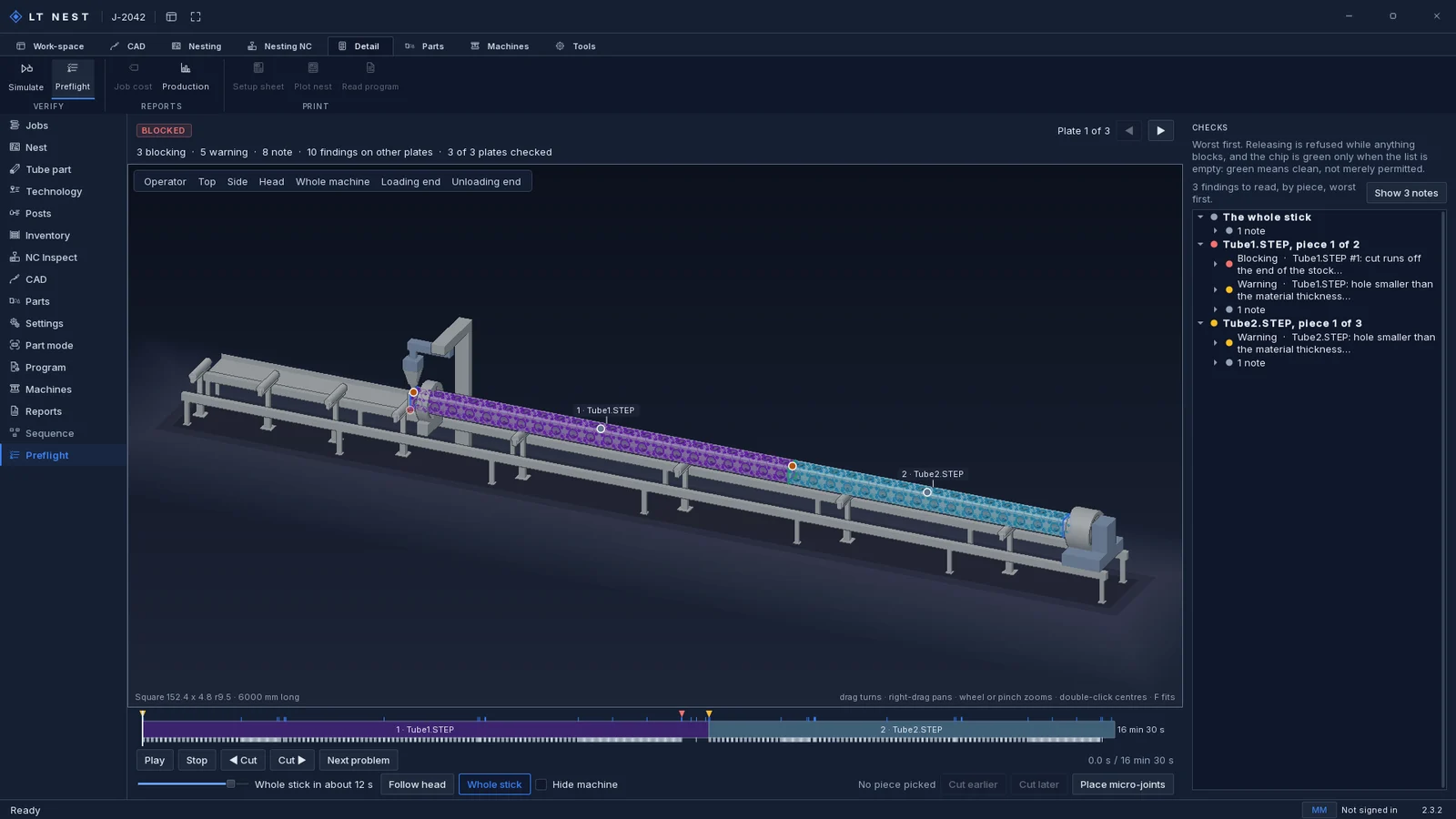
- Seven views and a camera that follows. Operator, top, side, head, whole machine, loading end and unloading end, plus Follow head while it plays.
- Any speed. A slider from real time to the whole stick in about twelve seconds, with stops at 4x and 16x, and a step to the previous or next cut.
- Next problem. Jumps to the next blocking problem or warning along the program and flies the camera to it, at the moment the head reaches it.
- Cut earlier, cut later, micro-joints. Reorder a piece on the stick or click a contour to place a joint. The program recompiles, and a move the safety rule refuses is said rather than kept.
What Lasertally Nest writes for the machine
| Output | For | Notes |
|---|---|---|
| Rotary G-code | Tube | Generic ISO G-code with a rotary axis. Untested on hardware by design, so every program is read back after it is written and verified against the geometry it came from before release. |
| Unrolled DXF | Tube | The whole nest, flattened. Imports into any CAM that reads DXF, so a job runs on day one while the G-code post is still being dialed in. |
| Layered DXF | Sheet | Cut geometry on layers, with a layer map carrying feed, power, gas and kerf, for any CAM package that reads DXF. |
| Micro-joints in G-code | Neither | G-code cannot express a deliberate gap in a continuous contour, so the post drops them, counts them and says so. One that was the only thing holding a part is named. |
| .zx and .ctds | Not written | Those formats are undocumented. A guessed implementation produces files that open, look plausible and cut wrong, so Lasertally does not write them. |
On your particular machine. You will notice there is no table of machine brands on this page. That is deliberate: I will not publish a compatibility list I have not actually posted to, because a wrong yes in that table costs you a scrapped stick and costs me the account. Email me your controller and I will tell you straight whether the post is dialed in for it, whether it needs work, or whether you should run the unrolled DXF through your existing CAM in the meantime.