Why STEP is the format to send
A STEP file carries the solid, not a picture of it. That is the whole difference. A drawing tells you what somebody meant to make and a solid tells you what the machine will actually cut, which is why every number on a Lasertally quote comes off the solid rather than off the drawing that accompanied it.
It matters more often than it sounds like it should. One real customer STEP file in the reference set contains 346 pierces. The drawing that came with it said fewer. Pierce count drives pierce time, pierce rate and a good share of the price on any part with holes in it, so counting them by eye off a PDF is where quoting money quietly leaks.
What Lasertally reads out of a STEP file
- Pierce count. Every hole and every internal contour that needs its own pierce, counted from the geometry.
- Cut length. The total distance the head travels cutting, in the units your shop works in.
- Bend count and flat pattern. A formed part is unfolded and priced on its developed flat pattern, with the bend allowance the metal actually needs.
- Bounding box. Which decides whether the part fits your stock, and it is one of the four pre-quote checks that must pass before Lasertally will price anything.
- Part type. Flat profile or tube, decided by measurement rather than by what the file was named.
Tube parts are detected, not declared
When a STEP file contains a length of tube, Lasertally finds the axis by measurement, classifies the section, and matches it against the standard sizes in your own material card. Ten section families are recognized: round, square, rectangular, obround, elliptical, triangular, angle, C channel, U channel and H beam. A section that matches none of them is called free form rather than guessed at, and it still quotes and still nests.
Nothing about that requires you to tell Lasertally the part is tube. You send the file the customer sent you.
One real file, all the way through
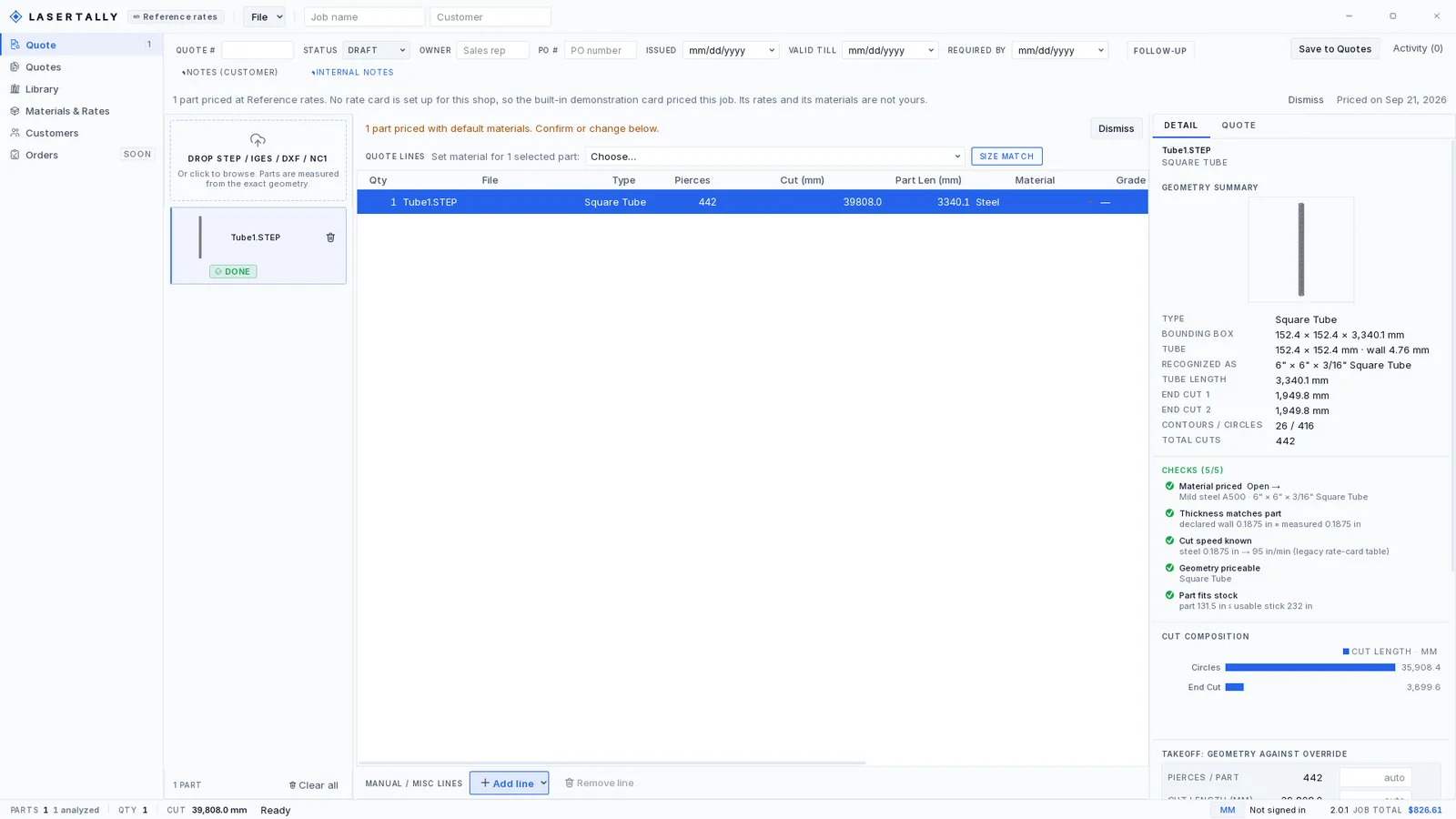
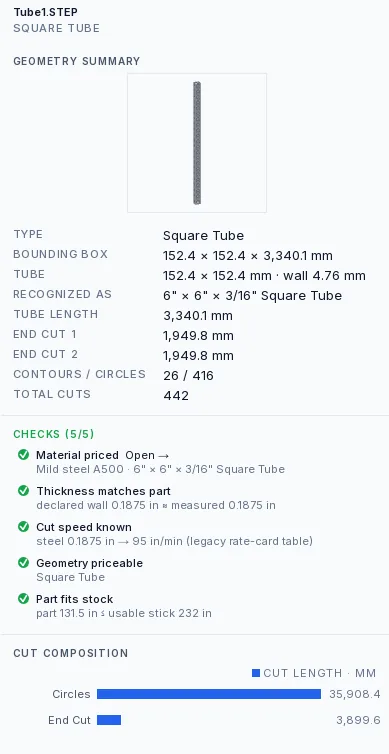
Here is a STEP file off a shop thumb drive, opened cold. Lasertally reads it as 6 inch by 6 inch by 3/16 inch square tube: 152.4 mm across the flats on a 4.76 mm wall, 3,340.1 mm long, which is 131.5 inches. It counts 442 pierces, splits the cut into 26 contours and 416 circles, measures both end cuts at 1,949.8 mm, and totals 39,808.0 mm of cut.
Then it checks itself, five times over, and says why each one passed. The material is priced. The declared wall matches the measured wall. The cut speed is known: steel at 0.1875 in, 95 in/min. The geometry is priceable. The part fits the stock, 131.5 inches into a usable stick of 232.
Nothing on that list was typed in, and none of it came off the drawing that arrived with the file.
.step or .stp, and what else works
Both extensions are the same format and both are read. IGES (.igs, .iges) carries a solid too and is handled the same way, including tube. DXF carries a flat 2D profile. DSTV NC1 (.nc1) carries tube and structural sections.
SAT and DWG are not supported. Every CAD package can export STEP, so exporting STEP is the fix rather than a conversion step somewhere in the middle.
Three steps, about thirty seconds
- Drop the STEP file in. The bundled geometry engine opens the solid on your own machine and measures it. Your file is measured locally before anything is sent.
- Confirm the metal. Pick material and thickness, or let the detected form pick a default and change it in one click. Rates come from your card.
- Send the quote. An itemized price with every figure traced to a measurement, ready while the customer is still on the line.
Drop a STEP file in and see what it measures.
Sheet or Tube is $479 a month, Complete is both for $759. Full refund inside 14 days if the numbers do not match your shop.